LeanPDM
Software de gestión colaborativa CAD
Collaborative CAD file management
Inicio Por qué Características Cómo funciona Precios FAQ Contacto Contratar

Acorte plazos y reduzca errores en el diseño mecánico

Shorten lead times and reduce errors in mechanical design

LeanPDM le proporciona un control total sobre el status del trabajo de todos sus ingenieros, ayudándole en la gestión y en la planificación de su oficina técnica

LeanPDM gives you complete visibility into the status of every engineer's work, helping you manage and plan your engineering department more effectively.
Ver demo LeanPDM
27€
Al año por usuario
Per year per user
<24h
De comprar a estar operativo
From purchase to start
0€*Es válido con tu sitio compartido actual
En servidores o infraestructura
In servers or infrastructure
1 mes
Devolución completa garantizada
Full refund guaranteed

Instalación rápida

Quick installation

En marcha en unas horas. Apunta a la carpeta compartida que ya tienes

Up and running in one day. Point it at the shared folder you already have.

Tus archivos, intactos

Your files, untouched

LeanPDM no toca tus archivos CAD. Si deja de funcionar, todo sigue donde está.

LeanPDM doesn't touch your CAD files. If it stopped working, everything stays where it was.

Sin cambiar nada

No changes

Se añade a tu espacio compartido sin cambiar nada de lo que ya funciona.

Keep using the same shared folder. Leanpdm fits right in without disrupting what already works.

Sí, hay vuelta atrás

Traceable

Todo reflejado. Y si algo sale mal, puedes volver a la versión anterior.

Who locked it, who published it… no need to ask anyone. If something goes wrong, you can roll back to the previous version.

Qué pasa sin élWhat happens without it

Sobreescrituras silenciosas
Silent overwrites
El último en guardar borra el trabajo del otro. Sin aviso. Sin vuelta atrás.
The last one to save erases the other's work. No warning. No undo.
Versiones sin control
Uncontrolled versions
_FINAL_v3_OK_def2.SLDPRT — Nadie sabe cuál es el bueno.
_FINAL_v3_OK_def2.SLDPRT — Nobody knows which is correct.
Referencias rotas
Broken references
En trabajos colaborativos se aumenta el riesgo de descuadre.
The CAD opens the part it finds by name, not the right one. Assemblies that go wrong with nobody knowing why.
El coste real de un error
The real cost of an error
Una pieza fabricada con el plano equivocado no es solo un coste de material.
A part manufactured from the wrong drawing isn't just a material cost.

Historial y trazabilidad

History & traceability

Cada archivo tiene su historial completo: quién publicó cada versión y cuándo. Si algo sale mal, sabes exactamente qué cambió y puedes recuperar la versión anterior con un clic.

Every file has its complete history: who published each version and when. If something goes wrong, you know exactly what changed and can recover the previous version with one click.

Estado en tiempo real

Real-time status

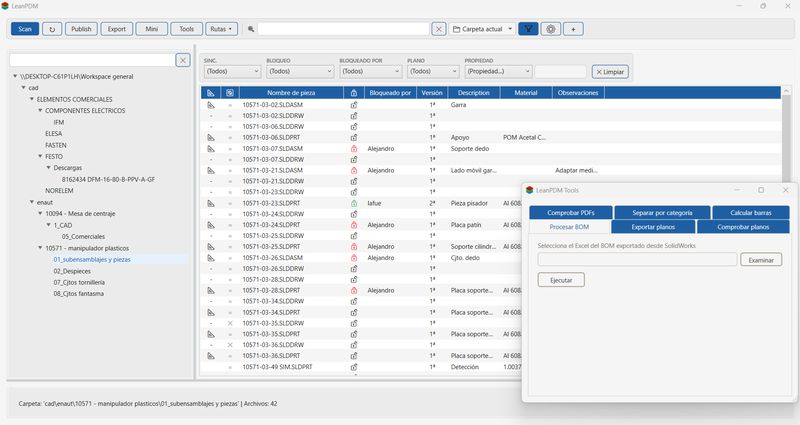
Ves qué archivos están sincronizados, cuáles tienen cambios locales pendientes y quién tiene bloqueado qué. El panel se actualiza automáticamente cuando guardas un archivo en el CAD.

You see which files are in sync, which have pending local changes and who has what locked. The panel updates automatically when you save a file in the CAD.

Mini panel flotante

Floating mini panel

Un panel compacto que puedes mantener visible mientras trabajas en SolidWorks. Bloquea, publica y descarga archivos sin salir del CAD ni perder el contexto de lo que estás diseñando.

A compact panel you can keep visible while working in SolidWorks. Lock, publish and download files without leaving the CAD or losing the context of what you're designing.

Exportación masiva PDF / DWG

Bulk PDF / DWG export

Selecciona los planos que necesitas — uno, varios o el proyecto entero — y LeanPDM los exporta en lote mientras tú haces otra cosa.

Select the drawings you need — one, several or the entire project — and LeanPDM exports them in batch while you do something else.

Compatible con tu versión de SolidWorks

Compatible with your SolidWorks version

Funciona con cualquier versión de SolidWorks que tengas instalada, sin configuración adicional. No necesitas actualizar el CAD para empezar a usar LeanPDM.

Works with any version of SolidWorks you have installed, with no additional configuration. No need to update your CAD to start using LeanPDM.

Filtros y búsqueda

Filters & search

Filtra por estado de sincronización, bloqueo, usuario o por cualquier propiedad del archivo CAD. Localiza al instante lo que buscas en proyectos con cientos de archivos.

Filter by sync state, lock state, user or by any CAD file property. Instantly locate what you're looking for in projects with hundreds of files.

01

GET

Descarga el archivo y todas sus dependencias — piezas, subconjuntos y planos — desde el espacio compartido de trabajo (workspace) a tu equipo.

Cuándo usarlo: si no se tiene en local archivos sobre los que se quiere trabajar, o cuando un compañero ha publicado cambios.

Downloads the file and all its dependencies — parts, subassemblies and drawings — from the workspace to your machine.

When to use it: when there are no local files to work on, or when a teammate has published changes.

02

LOCK

Mientras esté bloqueado, nadie más puede bloquearlo ni publicar sobre él. Si el archivo no está actualizado en tu equipo, LeanPDM hace el GET automáticamente. Si otro compañero ya lo tiene bloqueado, LeanPDM te indica quién.

Regla práctica: haz LOCK antes de modificar. Si no hay LOCK estás trabajando en "modo lectura".

While it's locked, nobody else can lock it or publish over it. If the file isn't up to date, LeanPDM runs GET automatically. If a colleague already has it locked, LeanPDM tells you who.

Practical rule: always lock before making changes. If there’s no lock, you’re working in read-only mode.

03

PUBLISH

Sube tu versión al workspace. LeanPDM registra la publicación con tu nombre, fecha y hora. Solo puedes publicar lo que tú has bloqueado. Si editando se añaden archivos nuevos al ensamblaje, se publican también. Si el archivo tiene un plano asociado, LeanPDM avisa de que puede haber quedado desactualizado.

Utiliza Publish también para subir al workspace nuevos archivos creados por tí.

Upload your version to the workspace. LeanPDM records the publish with your name, date and time. You can only publish files that you have locked. If new files are added to an assembly while editing, they are published as well. If a file has an associated drawing, LeanPDM warns you that it may be out of date.

Use Publish to upload new files you have created to the workspace as well.

04

UNLOCK

Libera el bloqueo. Tus archivos locales no se borran — solo se libera el archivo en el workspace.

Cuándo usarlo: al terminar una sesión sin publicar, cuando el cambio era incorrecto, o cuando un compañero necesita el archivo urgentemente.

Release the lock. Your local files aren't deleted — only the workspace lock is released.

When to use it: when ending a session without publishing, when the change was wrong, or when a colleague urgently needs the file.

// Más funcionesMore features

Muestra los componentes directos de cualquier ensamblaje — las piezas y subconjuntos que lo forman. Sin abrir SolidWorks, sin esperar a que cargue el modelo. Shows the direct components of any assembly — the parts and subassemblies that make it up. Without opening SolidWorks, without waiting for the model to load.
Para cualquier pieza o subconjunto, muestra en qué ensamblajes está usándose. Útil cuando necesitas saber el impacto de un cambio antes de hacerlo: si modificas esa pieza, ¿qué ensamblajes se ven afectados? For any part or subassembly, shows which assemblies it's being used in. Useful when you need to know the impact of a change before making it: if you modify that part, which assemblies are affected?
Vista global de todos los archivos bloqueados en el workspace en ese momento: quién tiene bloqueado qué. Global view of all files locked in the workspace at that moment: who has what locked.
Consulta las propiedades personalizadas de cualquier archivo CAD directamente desde LeanPDM sin abrir SolidWorks ni esperar a que cargue el modelo. View the custom properties of any CAD file directly from LeanPDM without opening SolidWorks or waiting for the model to load.
Toma el Excel del BOM exportado desde SolidWorks y lo transforma automáticamente: calcula las unidades equivalentes por nivel jerárquico, aplica formato profesional y genera hojas separadas por categoría (fabricación, compra, láser...) y una lista de pedido agrupada y sumada. Lo que antes era trabajo manual de horas, en segundos. Takes the BOM Excel exported from SolidWorks and transforms it automatically: calculates equivalent units per hierarchy level, applies professional formatting and generates separate sheets by category (manufacturing, purchasing, laser...) and a grouped and summed order list. What used to be hours of manual work, done in seconds.
Cruza el BOM con los planos realizados y genera un listado de qué archivos tienen plano y cuáles no. Evita mandar a fabricar sin tener todos los planos listos. Crosses the BOM with the drawings produced and generates a list of which files have a drawing and which don't. Avoid sending to production without having all drawings ready.
Verifica que cada plano tiene su PDF generado. Útil antes de enviar documentación a un cliente o proveedor para asegurarse de que no falta ninguno. Verifies that every drawing has its PDF generated. Useful before sending documentation to a client or supplier to make sure nothing is missing.
Desde Tools puedes exportar todos los planos de una carpeta a PDF o DWG de una vez, sin seleccionarlos uno a uno desde el panel principal. Elige la carpeta de origen, la carpeta de destino y el formato. LeanPDM hace el resto. From Tools you can export all drawings in a folder to PDF or DWG at once, without selecting them one by one from the main panel. Choose the source folder, the destination folder and the format. LeanPDM does the rest.
Una vez exportados los planos, esta herramienta los distribuye automáticamente en subcarpetas según la categoría del BOM. Si tienes piezas de láser, chapa y mecanizado, cada proveedor recibe solo sus planos — sin ordenar manualmente. Once the drawings are exported, this tool automatically distributes them into subfolders by BOM category. If you have laser, sheet metal and machined parts, each supplier receives only their drawings — no manual sorting.
Garantía de devolución
Money-back guarantee
100% · 1 mes
100% · 1 month

Si en el primer mes LeanPDM no cumple lo que promete, devolvemos el 100% sin preguntas. No necesitas justificarlo.

If in the first month LeanPDM doesn't deliver what it promises, we refund 100% with no questions asked. No justification needed.

Facturación flexible
Flexible billing
Elige entre facturación anual o trimestral. No pagues el año entero al principio si no quieres. Sin intereses.Choose between annual or quarterly billing. Don’t pay for the full year upfront if you don’t want to. No extra costs.
ContratarSubscribe
Actualmente con cualquier versión de SolidWorks posterior a 2016 y próximamente también para Inventor. Si usas otro CAD, contáctanos. currently available for any version of SolidWorks from 2016 onwards, and soon also for Inventor. if you use another CAD system, contact us.
Probablemente ya lo tienes. LeanPDM funciona sobre cualquier carpeta compartida a la que todos los usuarios tengan acceso: un NAS, un PC siempre encendido o un servidor de archivos Windows. No necesitas instalar nada en el servidor — solo apuntar LeanPDM a la carpeta compartida. Probably you already have it. LeanPDM works on any shared folder that all users can access: a NAS, a always-on PC or a Windows file server. No need to install anything on the server — just point LeanPDM to the shared folder.
Por usuario, vinculadas a la máquina del ingeniero. Si cambias de equipo, la migración es sencilla — contáctanos y lo resolvemos en minutos. Per user, tied to the engineer's workstation. If you change machines, migration is straightforward — contact us and we'll sort it in minutes.
Tú, en minutos. Descomprime la carpeta, ejecútala, envíanos el código que aparece y se activa la licencia con el código que te enviamos. El primer escaneo puede tardar dependiendo del número de archivos que contenga el espacio compartido — es el único momento en que LeanPDM necesita leer todos los archivos CAD para construir el índice. You, in minutes. Unzip the folder, run it, send us the code that appears, and the license is activated with the code we send you. The first scan may take some time depending on the number of files in the shared space — it’s the only moment LeanPDM needs to read all CAD files to build the index.
Sus archivos bloqueados quedan bloqueados hasta que un administrador los libere manualmente. El historial de sus publicaciones queda registrado permanentemente. La licencia puede reasignarse a otro usuario — contáctanos para gestionarlo. Any files they had locked remain locked until an administrator manually releases them. Their publish history is permanently recorded. The license can be reassigned to another user — contact us to manage it.
GET es una operación de solo lectura — dos usuarios pueden descargar el mismo archivo al mismo tiempo sin ningún conflicto. El problema ocurre al modificar, no al descargar, y para eso existe el LOCK. En cuanto a si LeanPDM dejara de funcionar: LeanPDM no toca tus archivos CAD. Los archivos siguen en la carpeta compartida exactamente donde estaban. Lo peor que puede pasar es volver a trabajar como antes. GET is a read-only operation — two users can download the same file simultaneously with no conflict. The problem happens when modifying, not downloading, and that's what LOCK is for. As for LeanPDM stopping working: LeanPDM doesn't touch your CAD files. Files remain in the shared folder exactly where they were. The worst that can happen is going back to how you worked before.
Funciona. Hasta que dos personas tocan el mismo archivo el mismo día. ¿Cuándo fue la última vez que alguien pisó el trabajo de otro? Si no recuerdas ninguna, llevas suerte. Si sí recuerdas, ya sabes cuánto costó. It works. Until two people touch the same file on the same day. When was the last time someone overwrote someone else's work? If you can't remember any, you've been lucky. If you can, you already know what it cost.
Los proyectos pequeños tienen menos margen. Una pieza fabricada con el plano equivocado puede comerse el margen entero. El tamaño del proyecto no reduce el riesgo — lo concentra. Small projects have less margin. One part manufactured from the wrong drawing can eat the entire margin. Project size doesn't reduce the risk — it concentrates it.

// EscríbenosWrite to us

¿Qué es un PDM?

El Gestor de Datos de Producto (PDM) es un sistema que gestiona la información de los archivos que genera un programa de CAD.

El PDM centraliza estos datos y ayuda a los ingenieros a controlar los procesos colaborativos de diseño. Los PDM crean un espacio compartido como referencia única de información para todos los datos de diseño.

Todo el equipo trabaja siempre con la información sincronizada, evitando errores causados de archivos duplicados o desactualizados. Registra el historial de modificaciones, lo que permite controlar y recuperar las versiones, eliminando así errores de sobrescrituras accidentales.

What is a PDM?

A Product Data Manager (PDM) is a system that manages the information of files generated by a CAD program. A PDM centralizes this data and helps engineers control collaborative design processes. PDMs create a shared space as a single source of truth for all design data. The entire team always works with synchronized information, avoiding errors caused by duplicate or outdated files. It records the modification history, allowing version control and recovery, thus eliminating errors from accidental overwrites.